
Buy Now

novaPDF Professional
$62.44 $49.95

novaPDF Standard
$53.27 $39.95

novaPDF Lite
$24.94 $19.95

Awards & Reviews

  • 1_ico
  • 2_ico
  • 3_ico
  • 4_ico

Lockergnome feature

novaPDF is really neat

"novaPDF – Print To PDF Without Breaking The Bank. After downloading and installing the program (which takes all of one minute) you’re ready to print to a PDF. Any program that can print via the standard Windows printer interface can print to PDF (i.e. convert a file to PDF), including text, Word, Excel, […] , novaPDF will convert your files into PDF format without making your wallet cry."

Editor’s Review

This application is great

"[...] Pluses: novaPDF supports multiple profiles. This means that all your settings can be easily saved or loaded. Another great feature is the program’s ability to put bookmarks into the PDF document it creates. Drawbacks/flaws: [none] In conclusion: This application is great for generating PDF documents out of any type of printable data."

Indezine Review

Provides a good balance

"[...] novaPDF provides a good balance between price and performance -- it's a very usable option between free and highly priced PDF creators so that you can provide PDF output capabilities to a large number of users at a reasonable cost."

AC Review

Extremely easy to use

"[...]I highly recommend NovaPDF as a great and very simple way to create standard PDF documents that are fully compatible with Adobe Acrobat Reader. Nova PDF creator is an extremely easy to use and simple PDF creator"

Latest News

November 24, 2009

novaPDF 7 was released.

Changes in version 7:
  • Added option to digitally sign PDF files
  • Type1 fonts are now supported
  • novaPDF now includes add-ins for Microsoft Office (Word and Excel)
  • Added a start page to allow quick access to create PDFs
  • Fully compatible with Windows 7

You can download version 7 here: Download novaPDF 7

Stay Updated

To join, simply enter your email address below and click on Subscribe.

About Us

Softland, the company that develops novaPDF, achieved the Microsoft Certified Partner status with an ISV/Software Solutions Competency. Microsoft Certified Partner
Add comment
Votes: 0
Comments: 0

Windows XP (or previous versions) by default does not install some supplemental language files when the main language used for the setup is English. Because of this, if you want to convert a document that contains characters from East Asian languages (such as Chinese, Japanese, Korean or Vietnamese), some of these characters might not be correctly converted. The fact that these characters  might not be converted is in fact an operating system issue rather than a novaPDF bug .

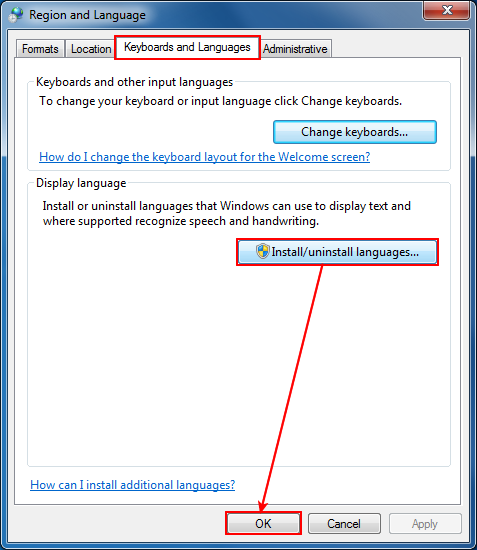
If you are experiencing issues where some Chinese, Japanese, Korean or Vietnamese characters that show in your original document aren't included in the PDF file or are wrongfully converted, follow these steps to ensure that your system has all the needed language files and that future generated PDF files will be correctly converted:

  1. Go to Start->Settings and open the Control Panel
  2. Double-click on the Regional and Language Options icon
  3. Go to the Languages tab of the Regional and Language Options window
  4. In the Supplemental language support section, check the first option Install files for East Asian languages.
  5. Press OK. You might be asked for your Windows installation CD, so make sure you have that handy. After the language files are installed, you will have to restart the computer. After being installed, you will be able to print the equations (formulas) to PDF using novaPDF.
Add comment
Name:
Email:
* Comment:
(Use BBcode - No HTML)


Others in this Category
document Merge PDF files with novaPDF
document Convert projects created with Microsoft Office Project to PDF files
document QuarkXPress to PDF
document Convert Access to PDF
document How to install and use nova PDF Server as a shared network PDF Printer
» More articles
RSS

Legal Notices Terms of Use

Copyright Softland 2009. All rights reserved.