


novaPDF, your powerful PDF creator
novaPDF is a PDF printer for Windows that allows you to easily create 100% industry-standard PDF (Portable Document Format) files.
Any printable document can be converted to a PDF (searchable and PDF/A compliant).
It's never been easier to print to PDF, you simply open your document, click on Print and select novaPDF as the printer to generate the PDF. Try it now and see how easy it is to create PDFs.
novaPDF Overview
Going paperless has never been easier!About novaPDF
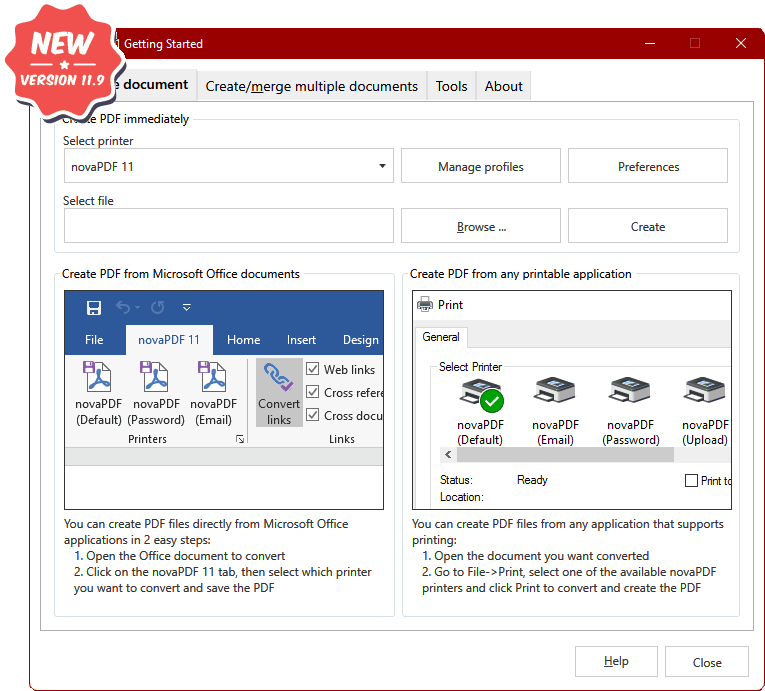
With novaPDF you can easily create PDF files from any printable document, just as you'd print to a physical printer. Its intuitive interface makes it easy to use for beginners, but also includes advanced features for power users. Download a trial version now and use it for free for up to 30 days.
novaPDF is compatible with the following operating systems: Windows 11, 10, 8, 7, Vista, Server 2025/2022/2019/2016/2012/2008R2 (x86/x64)
Here's just a few of benefits you get when using novaPDF:- Save Time - Speedy one-click installation and fast PDF creation
- Save Money - Switching to PDF instead of regular paper significantly reduces the cost.
- Stay Safe - Password-protect PDF files using military-grade 256-bit AES encryption.
- Improve Collaboration - Sharing PDF documents is faster & easier than sending faxes.
Main features
Universal printing
Using novaPDF you convert to PDF any type of printable document (i.e. DOCX, XLSX, PPTX, PUBX, HTML, TXT,...), accessing its functionality through a printer driver interface.
If novaPDF is installed you can simply click the "Print" button from any document-related Windows app to have your PDF created. You can also use novaPDF's Getting Started interface.
If novaPDF is installed you can simply click the "Print" button from any document-related Windows app to have your PDF created. You can also use novaPDF's Getting Started interface.
Add-ins for Microsoft® Office
novaPDF comes with add-ins for all Microsoft Office applications: Word, Excel, PowerPoint, Publisher, Visio and Outlook. It allos one-click conversion to PDF from Office apps.
A major advantage of the add-ins is the conversion of hidden hyperlinks and easy conversion of bookmarks.
PDF Security
You can secure your PDF documents (256-bit AES encryption) by requiring recipients to enter a password in order to view, print or copy/paste content from the PDF.
You are able to control whether the PDF can be viewed, printed, modified, copied or annotated. Furthermore, you can apply digital signatures certify the authenticity of the PDF document.
You are able to control whether the PDF can be viewed, printed, modified, copied or annotated. Furthermore, you can apply digital signatures certify the authenticity of the PDF document.
Testimonials
What our users say about novaPDFnovaPDF OEM
Post-processing PDF solution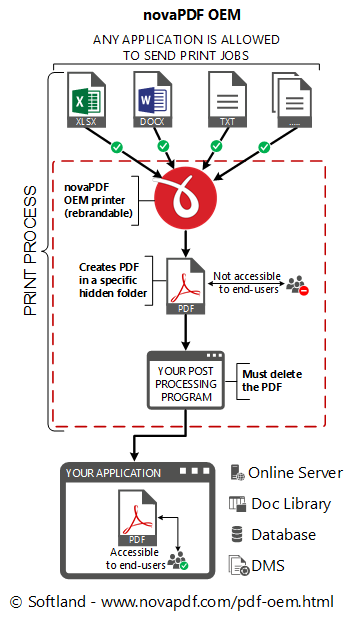
novaPDF OEM Developer is a post-processing PDF solution for developers that want to add PDF creation capabilities to their applications.
It has to be installed silently as a PDF printer directly from your application's setup. Once installed it can convert to PDF any document sent to it for printing and save that PDF in a pre-defined location. It is compatible with the following operating systems: Windows 11, 10, 8, 7, Vista, Server 2025/2022/2019/2016/2012/2008R2 (x86/x64)
novaPDF OEM Developer includes a Customization tool that lets you configure the novaPDF OEM printer distribution. The novaPDF OEM printer has to be distributed and comes with royalty free licensing. It can be rebranded for an additional fee.
It also comes with documentation detailing its installation, integration and distribution, as well as a code sample.
Details regarding novaPDF OEM Developer:
- You don't have to integrate anything into your application. Since no integration is required your application can be written in any programming language and you will still be able to use novaPDF OEM.
- It is mandatory to distribute the novaPDF OEM printer in your application's setup. This is done under royalty free licensing (you only pay for the OEM license).
- novaPDF OEM can be fully rebranded so end-users will not see the novaPDF brand at all (rebranding is optional and requires an additional payment).
- You can integrate it without ordering and purchase a license after you have fully tested it. When unlicensed a watermark will be added to all PDFs created with it.
- The licensed novaPDF OEM printer allows users to create PDF files from any application with printing capabilities.
- The resulting PDF files must be accessible only to your application.
- You are not allowed to develop a PDF creator using novaPDF OEM. Your application must have additional relevant functionality.
novaPDF SDK
Pre-processing PDF solution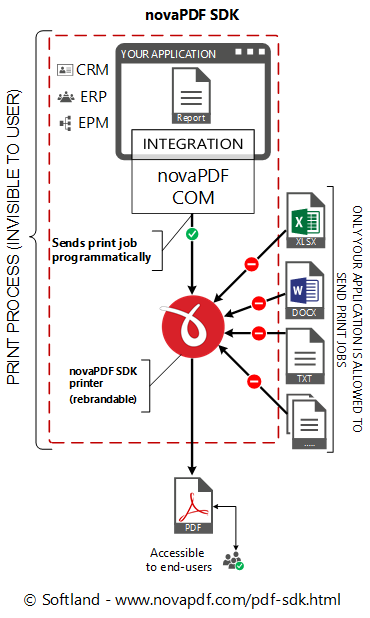
novaPDF SDK Developer is a pre-processing PDF software development kit for developers that want to add PDF creation capabilities to their applications. Once installed the SDK will let you convert to PDF any printable information sent by your application. Integration is seamless, end-users will not realize a printer driver is used in the process. It is compatible with the following operating systems: Windows 11, 10, 8, 7, Vista, Server 2025/2022/2019/2016/2012/2008R2 (x86/x64)
novaPDF SDK Developer includes a COM interface to programmatically control the novaPDF SDK printer options and also a Customization tool that lets you configure the novaPDF SDK printer distribution.
It also comes with documentation including several code samples (ASP.NET, C#, CPlusPlus, Delphi, Java, Ms Access, Visual Basic, VBNet) and the novaPDF SDK printer that you have to distribute with royalty free licensing. Can be rebranded for an additional fee.
Details regarding novaPDF SDK Developer:
- A COM object has to be integrated into your application. novaPDF SDK works with most programming languages (C/CPlusPlus/C#, Visual C, Delphi, Visual Basic, ASP.NET, Java ...).
- It is mandatory to distribute the novaPDF SDK printer in your application's setup. This is done under royalty free licensing (you only pay for the SDK license).
- novaPDF SDK can be fully rebranded so end-users will not see the novaPDF brand at all (rebranding is optional and requires an additional payment).
- You can integrate it without ordering and purchase a license only after you have fully tested it. When unlicensed a watermark will be added to all PDFs created with it.
- The licensed novaPDF SDK (COM object) lets users create PDFs without the watermark only from your application, not by printing directly to the printer.
- Your end-users can access the resulting PDF files as they wish.
- You are not allowed to develop a PDF creator using novaPDF SDK. Your application must have additional relevant functionality.
Tutorials
Watch videos that show novaPDF in actionNews and Articles
Read the latest news and articles about novaPDFWe're Softland
Learn more about the company that makes novaPDFAbout us
Softland is a company founded in 1999, committed to providing quality software by using innovative development solutions. Our own competitively priced products target two different fields: PDF creation (novaPDF) and file backup (Backup4all).
About usContact Softland
Contact us with any questions/suggestions you might have regarding novaPDF. If you are experiencing errors with novaPDF, we recommend checking first if there isn't already an answer in the FAQ, Knowledgebase or in our Forum.
Get in touchPartner with Softland
Partner with us and start offering your clients a powerful PDF creator. We offer 3 different partner programs: Resellers, Affiliates and Rebranding. Read more and compare them to see which fits best by visiting the Partners section.
Partner programsnovaPDF in numbers
novaPDF is continuously developed since 2005K+
Hours of coding
K+
Lines of code
K+
Downloads
K+