


This tutorial shows how to create and send a PDF document via e-mail using novaPDF Professional edition and examples on how to configure the email for sending to the Kindle and IPhone mobile devices. novaPDF is a PDF creator that allows generating PDF files from any Windows application that supports printing. If you don’t have novaPDF installed, use the Download page to download and install it.
On this page:
- Creating the PDF document and configuring e-mail sending options
- Video Tutorial Create and Email PDF
- How to create and send PDF to Kindle
- How to create and send PDF to iPhone
Any PDF document created from another file format can be sent via e-mail if you choose so. However, this option is only available in novaPDF Professional. Sending the document in PDF format is an advantage when sharing the file with other users (in this case, the user does not need to install the program used originally to create the file) or sending it to mobile devices such as Kindle or IPhone as the devices only recognize certain file formats including PDF.
Creating the PDF document and configuring e-mail sending options
Once you have novaPDF installed, the process of creating a PDF from a printable document is as simple as clicking the Print button. novaPDF has an option that allows you to send a PDF via email once it’s created (this can be done automatically with no further input from your part).
You can set the email sending option in two ways:
- enabling it for a printing profile, meaning that whenever you convert a document to a PDF using that printing profile it will be sent immediately via email (with the same predefined email configurations as set in the profile)
- enabling it for a one-time print job, meaning that a PDF will be sent via email only for that particular printing job you are enabling the option for
These are the steps for creating a printing profile that will send the PDF via e-mail for each current and subsequent printing jobs that use this profile:
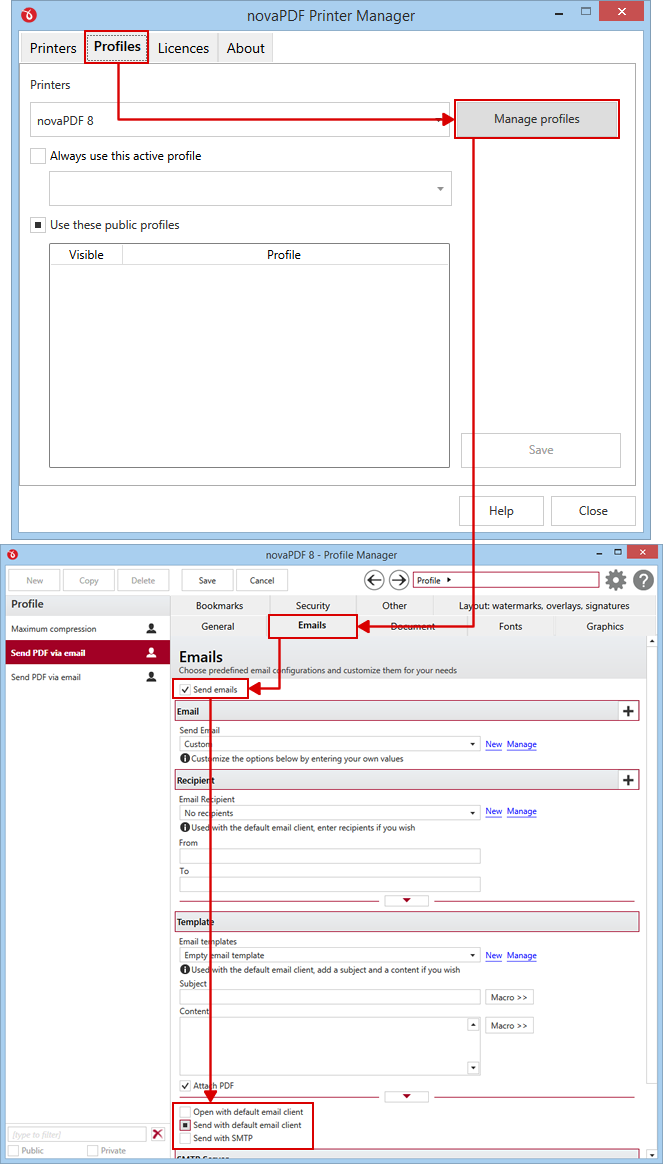
- Open Printer Manager (go to Start and type "novaPDF printer manager" in Windows 8, or go to Start->Programs->novaPDF in Windows 7 or previous) then click on Profiles->Manage Profiles.
- Click on New to create a new profile (if you don't want to edit the current one) and enter a Name/Description for it in the General section
- Go to the Emails tab and check the option Send emails. By default the email client will be opened and you will have to press the send button, however if you want you can also have novaPDF send the PDF automatically using your email client or define a SMTP server
- You can switch between the sending options by checking the respective radio button under the Template section:a. Open default email client: If this option is selected, when the PDF is created, the default mail client new message window opens and you have to fill in the mail details for sendingb. Send with default email client: If this option is selected, the PDF document will be sent using the email account setup in the default email clientc. Send with SMTP: If this option is selected, you have to configure the SMTP server and the e-mail address you want to use for sending.
- Fill in the Recipient section which email addresses you want to send the PDF to and under Template select the subject/content and attachment options for the email.
- Click on the Save button to save this printing profile. The new profile will be available for other print jobs as well and if you define new ones you can switch between them from the Printing Preferences window.
Video Tutorial Create and Email PDF:
These are the steps for setting up a one-time configuration (the PDF will be sent via e-mail for the current print job only):
- Open the document that you want to convert to PDF
- Select the Print option from that program’s menu and from the Printers (or Select Printer) list choose novaPDF
- After the printer has been selected, click on Print and choose a location where to save the PDF document.
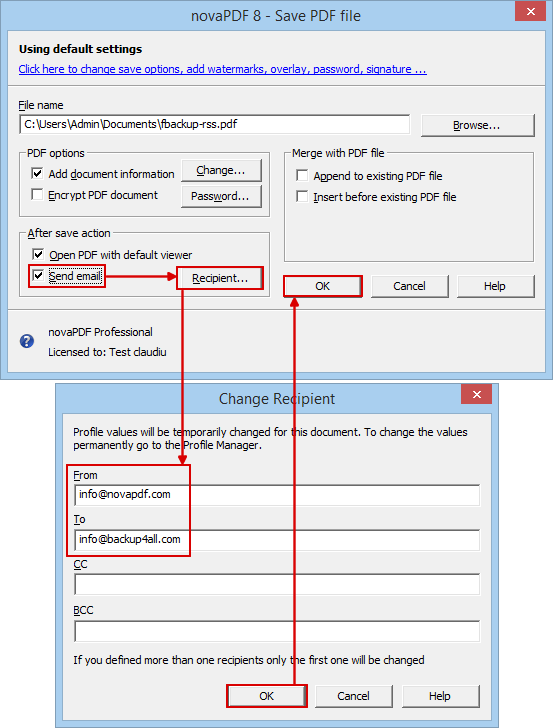
- After you setup the path and the PDF document name, in the After save action area click to enable the Send Email checkbox
- After enabling the checkbox you have to click on the Recipent button to enter the From/To email addresses (as well as CC/BCC if needed)
- Click on OK and the PDF will be created and after that your default email client will open with the PDF attached and ready to be sent
How to create and send PDF to Kindle
Kindle is a wireless document reader manufactured and distributed by Amazon. The first versions of Kindle (1 and Touch) do not offer support for opening 3rd party documents (such as PDF files) but only documents that are in a proprietary format (AZW). Sending PDF files to a Kindle 1 or Kindle Touch device requires emailing the PDF first to Amazon where after a conversion into AZW format it will be sent to the Kindle device where you can open and read the contents of the former PDF file.
The newest versions of Kindle (DX, Keyboard and Fire) can view other document types, so opening PDF documents on them is done without any additional conversion. This means that in order to view PDF files on Kindle DX, Keyboard and Fire, you can transfer the PDFs via a wireless connection from your PC.
To read more about this, see the Send PDF to Kindle article.
How to create and send PDF to iPhone
The iPhone is an Internet-connected, multimedia Smartphone designed and marketed by Apple Inc. The device functions as a camera phone, a portable media player and an internet client (with e-mail, browsing and Wi-Fi connectivity)
IPhone has an internal email program that can access any POP3 or IMAP email account. Since it also offers support for viewing PDF, Word, Excel and PowerPoint attachments, sending a PDF file to your IPhone is as simple as emailing it as an attachment to the email account used on the iPhone.
How to create and send PDF documents to your IPhone:
- Open the document you want to convert to PDF
- Go to File->Print and select novaPDF as the printer name
- Click on novaPDF’s Properties button, go to the Email tab, enable the Send email box and setup the email sending options (the TO email address must be the same as the one used on your iPhone)
- Click OK to convert and send the PDF file
- Open the PDF document without any additional conversion directly on the iPhone
This tutorial shows how to create and send PDF documents via e-mail using novaPDF and examples on how to configure the email for sending to the Kindle and iPhone mobile devices. If you have suggestions on how to improve this article add a comment or rate it.