


This tutorial shows how to use ConvertLIT GUI, Stanza and novaPDF to convert a LIT (Microsoft Reader eBook) file format to a PDF document. novaPDF is a PDF converter that allows creating PDF files from any Windows application that supports printing. If you do not have novaPDF installed, use the Download page to download and install it.
On this page:
- Convert LIT to an open source format (htm) using ConvertLIT GUI
- Video Tutorial ConvertLIT to PDF
- How to convert LIT to PDF from the Stanza eBook Reader
- Video Tutorial Stanza to PDF
.LIT is a proprietary file extension for the Microsoft eBook Reader, based on the chm file format system. The LIT format cannot be converted to PDF directly using novaPDF because Microsoft Reader does not have a print option due to security restrictions. As a workaround, there are tools that can be used to convert .lit files to open source formats, one of them being ConvertLIT GUI. By installing novaPDF you can convert LIT files to PDF with ease. Simply press the Print button once you have chosen novaPDF as a printer and your LIT file will be converted to a PDF.
Convert LIT to an open source format (htm) using ConvertLIT GUI
ConvertLIT GUI is an open source tool used specially for converting LIT files to open source formats such as htm.
To convert LIT to .htm using ConvertLIT GUI:
- Download and install ConvertLIT GUI from http://dukelupus.com/convertlit.gui
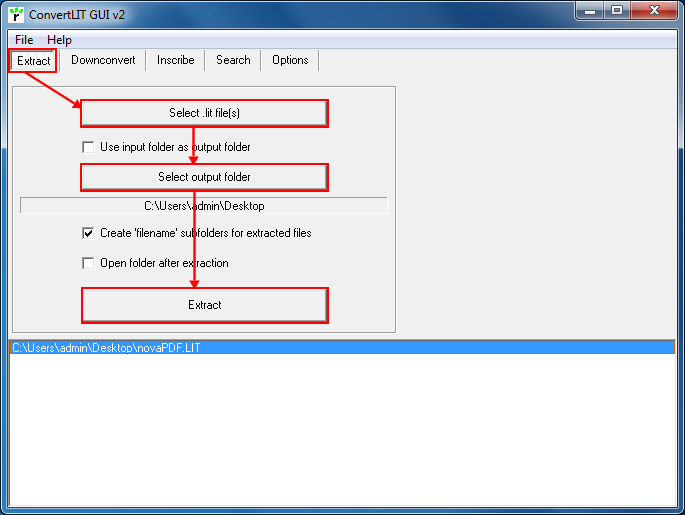
- Open ConvertLIT GUI, go to the Extract tab and click on the Select .lit files button to choose the LIT file you want to convert to .htm
- To choose where to save the converted LIT file, either enable the Use input folder as output folder box or click on the Select output folder button to set a custom location
- Press the Extract button and ConvertLIT GUI will convert the LIT document to a .htm file and save it in the specified folder
- After the conversion is finished, open the htm file in your default browser and convert it to a PDF document using novaPDF as described in the following article: Convert a web page to PDF
Video Tutorial ConvertLIT to PDF:
How to convert LIT to PDF from the Stanza eBook Reader
Stanza is a freeware eBook reader from Lexcycle which supports reading information from multiple formats including HTML, ePUB, Mobipocket, Amazon Kindle, Microsoft LIT and more. So you can open your LIT eBook in the Stanza application and convert it to a PDF file using the novaPDF printer driver for easier management on your PC and your wireless devices. PDF is an ISO standard in portability and file archiving making it easier to manage and share with other people as there are a lot of applications out there supporting it for reading and other document enhancements. To be able to convert your LIT eBook to a PDF format you have to do the following things:
- Open Stanza, click on File -> Open File and browse for the LIT book you want to convert to PDF.
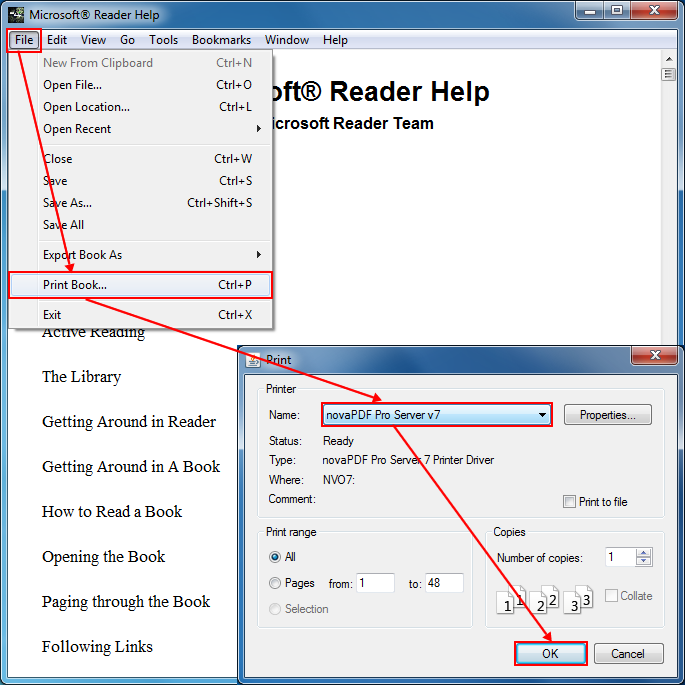
- After loading the file in the Stanza interface click on File -> Print Book (or press Ctrl+P) and the Print window will appear.
- Select novaPDF from the Printer dropdown list, choose if you want multiple copies for the file or certain pages to be printer and click OK to open the Save PDF File As window.
- In the Save PDF File As dialog choose a custom path for the PDF if needed, select after save actions and merging options for the PDF and click OK to start the conversion.
Once the printing has been completed the PDF file will be automatically opened in the default PDF reader if you have chosen this option for your novaPDF installation.
Video Tutorial Stanza to PDF
This tutorial shows how to convert LIT files to PDF documents using ConvertLIT GUI and novaPDF. If you have any suggestions on how to improve this article add a comment or rate it.