QuickBooks Simple Start is the freeware edition of the popular QuickBooks accounting software from Intuit. Users can handle their finances, sales, expenses and time their efforts as efficiently as possible. However sharing related, this software can become a pain as all the people collaborating on a project would need QuickBooks installed on all their computers to be able to open the documents. An advantage would be to have all the files in PDF format. This way the files can be shared and managed easier by different teams. With the help of a converter such as novaPDF, this process of conversion is seamless. Just download and install novaPDF from our Download page.
On this page:
An accounting software is basically a must have for all the companies looking to organize their finances, keep track of all their sales and expenses within the company and manage their project time efficiently all within the same interface. QuickBooks is one of the best such applications available and apart from all these functionalities, it also features an online accounting module. Still, if the various forms and accounting files need to be transferred over from one office to another or one team to another, it will be hard to share them as a QuickBooks format. So converting them to a PDF would be the way to go. As a PDF, users will view and manage the documents easier, will be able to protect sensitive information in them and also share them safely. novaPDF offers all these functionalities and more, so download and install it, then simply click on Print in your QuickBooks application to convert your accounting files to PDF.
Convert QuickBooks to PDF
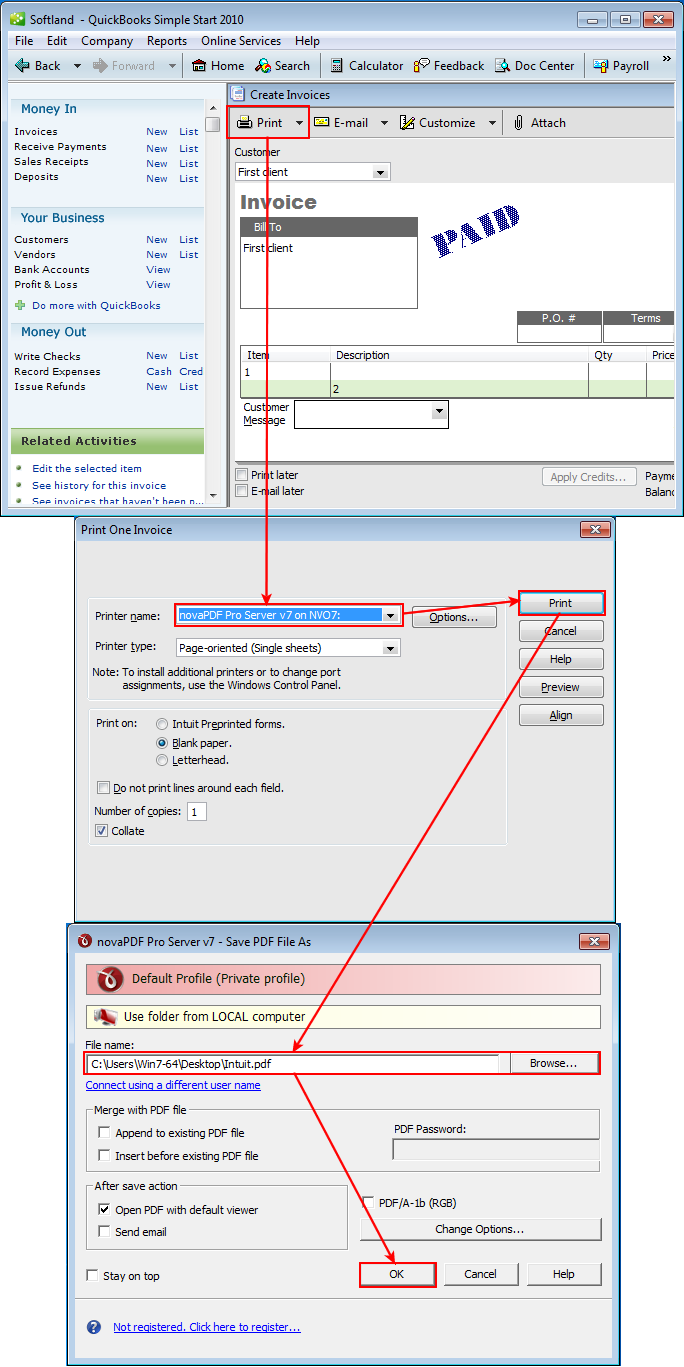
PDF documents can be created easily by having novaPDF installed as a virtual printer. To convert your invoices and forms to PDF documents, take the following steps:
- Download and install novaPDF by using our Download page.
- Select your invoice from the list, customize the layout for it and click Print.
- In the application print window, select the Printer name and type, additional options and click Print.
- When the novaPDF Save PDF File As window, choose the file name and location, merging options and click OK to start the conversion. After the conversion is complete, the PDF will be opened in the default viewer.